Using Secure Passwords

This morning, this article about a Facebook board member’s account being breached inspired me to touch on passwords again. I’ve talked about secure passwords in the past, but on a daily basis I am confronted by people that talk about not wanting to use a more secure password because it “would be hard to remember” but then they will complain when their Facebook or Twitter accounts are hacked.

To begin, lets rehash what makes a strong password.  A strong password has all the following:

  • Upper and lower case letters
  • At least one number
  • At least one special character (!,@,#,$,%,^,&*,(,), “,<,>)
  • Absolutely nothing to do with you or someone close to your.

That last one is kind of important.  You want to avoid things like names, birthdays, anniversaries, and so on.  Children and pets’ names are also a huge no-no.  The more random the password and the less it has to do with you as a person, the better it is.

To test your password’s strength, you can look at this Javascript Password Strength Meter.  This meter gives you a score and tells you how secure your password is.  If you have anything less than mediocre, you should probably reconsider your password and create a new one.  On the same page there are tips on creating a secure password and even a link to a password generating application (and browser plugin).

Using a secure password is extremely important in a world where we have several passwords for many different services.  If you need help remembering your passwords, you should look into something like LastPass or KeePass.  Both are a type of “password safe” in that you can store passwords for different sites and only have to remember a single password to the password safe application.  Both of them also have built in password generators that you can utilize to create secure passwords for each site that you use that might require a password.

So again, I urge you dear readers to start using more secure passwords (if you’re not already).  It can save you a lot of heartache in the end.

Posted in Internet, Security | Tagged | Comments Off on Using Secure Passwords

mkoby.com Goes Social

You’ve probably noticed by now that there are two new buttons at the beginning of each post.  One for retweeting and one for liking on Facebook.  I decided it was time to add some of these buttons to allow users to tell their friends and followers about posts they like.

Social Buttons on mkoby.com

The way that the buttons work should be fairly obvious but just in case, I’ll run through the basics real quick.

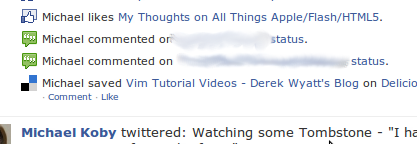
  • Facebook Like: The “Like” button, when clicked will add an item to your Facebook profile that says you “liked” the article and will include a link back to the original article.  (see example below).

Facebook Like Example

  • Retweet:  This button will allow you to log into Twitter and retweet the article to your followers ( it will look like “RT @mkoby TITLE link”).
Posted in Updates, Websites | Comments Off on mkoby.com Goes Social

Emacs & VI (Vim)

Over the last few months I’ve been on a kick to reconnect with some old skillsets I used to have and relearn Emacs. While I was never particularly good at using emacs I could at least navigate files and understood buffers. Visual Studio and Eclipse spoiled me and I forgot about such things.

The thing about editors like Emacs or Vim (VI Improved) is that they are completely cross platform.  There is a version of both that runs on all operating systems (Windows, Mac, Linux, etc).  In fact, VI is part of the Unix standard and any version of Unix doesn’t actually qualify as Unix without VI being installed.

I started back on Emacs because that’s what I had spent the most time in back in the day (as they say).  But lately I’ve been reading that some colleagues and other programmers that I follow (blogs, twitter, etc) are using Vim these days.  Even going so far as to attempt to do their .NET programming in it, so I started looking at that again.  What follows below are some resources that might help you learn about these editors.  Learning either Emacs or Vim will allow you to have an editor that is available on all systems and thus you can truly learn one editor and use it the rest of your life regardless of operating system.

Emacs Resources:

  • Peep Code – Meet Emacs ($9): This is a nice one hour screencast that covers many of the basics of using Emacs. It covers navigation, buffers, plugins, and other general use topics.
  • Emacs Starter Kit (my personal fork): This is a nice pre-configured emacs.d folder. This comes with several plugins, modes, and other useful things for making Emacs a joy to work with, especially when it comes to dynamic languages. My personal fork includes the color schemes, and yasnippets.
  • FOSSCasts Emacs: Some more (free) screencasts for learning Emacs.
  • Emacs Wiki: Many useful pages with lots of nice info about using and setting up various features in Emacs.

Vim Resources:

  • Derek Wyatt’s Vim Tutorial Videos: This awesome set of videos is designed to take you from novice to beyond novice with using Vim. Derek is energetic enough that you almost never get bored and the videos are informative.
  • VimCasts: While not so much for “beginners” there are lots of good screencasts here for Vim users.

There you go. Hopefully these will get you on your way to using an open source cross platform editor. Do try and ignore the holy wars around these two editors, each one serves different people differently and as such what works for you might not work for someone else. Find the one you like and use it.

Posted in programming | Tagged , , , | 4 Comments

H.264 vs. Theora (Software Patents)

Last week in response to an open letter about H.264 and Theora, Steve Jobs said:

All video codecs are covered by patents. A patent pool is being assembled to go after Theora and other “open source” codecs now. Unfortunately, just because something is open source, it doesn’t mean or guarantee that it doesn’t infringe on others patents. An open standard is different from being royalty free or open source.

You’ll notice that Steve Jobs says that all video codecs are covered by patents.  However this is just not true.  Theora is patent free and was designed as such.  The Theora codec is similar to the Vorbis codec for audio in that it is designed and written to be patent & royalty free.  Anyone can implement it and use it without having to pay some governing body.

The thing about H.264 is that, while it might be an open standard (in otherwords anyone can write an implementation based on the published standard) it is not in fact royalty free.  The governing body (MPEG LA) has said that H.264 will remain royalty free for web video through 2015.  This means that come January 1, 2016, they could start asking for cash.  And not everyone is going to be able to pay for the right to use it.
Continue reading

Posted in Commentary, programming, Technology | Tagged , , , , | 4 Comments

My Thoughts on All Things Apple/Flash/HTML5

Over the weekend I was involved in several discussions regarding Apple, Flash, and HTML5. I was quite opinionated on the subjects to the point of getting marginally upset at times because I feel that some people don’t understand the influence that Mr. Steve Jobs has on Apple fan boys who then spew his half truths around the internet without really understanding what they’re saying and how much they don’t really know.

Steve Jobs is a Business Man

To begin with, Steve Jobs is a business man.  A very good one too.  He is the master of the keynote and an expert marketer.  He knows how to announce, release, and talk about his products and competitors.  He’s very articulate and excellent at getting his ideas across.  Because of this, a lot of what he says is taken as fact, and many don’t look at things more deeply than his word and repeat his thoughts.

Steve Jobs is also king of telling people when they need something and when they don’t.  A great example is 3G.  When the first iPhone was released someone asked him about 3G and he said “Edge is good enough, people don’t really need 3G” and then one year later, he announces the iPhone 3G with 3G connectivity.  He’s done this on more than one occasion (just on the iPhone: multi-tasking, flush earphone jack, native application development, etc).  So when Jobs says that we need to move away from Flash, people listen.  The problem is, that when you talk about his little diatribe against Flash, it’s filled with half truths on both Flash and H.264 (and competing video codecs).  You can read one flash developer’s break down of those half truths.

The point here is that Steve Jobs is going to point out things that will only help his business long term.  Flash is destructive to his iPhone app business so he’s blocking it and giving his reasons.  Now granted he is posting his reasons to the public which not every CEO would do.  And he is attacking Flash and fighting for open standards and getting people to talk about and become aware of those standards, so that is a very good thing.

Video on the Web

I agree that Flash has problems that need to be addressed.  But I will also admit that most video on the web is displayed in a flash player.  The reasons for this are mainly due to the need to lock video down and protect the stream.  The current HTML5 video implementation does not have a way for people to protect the video stream, this is why you don’t see companies like Hulu or Netflix utilizing HTML5 for their streaming videos.  Those kinds of things need some form of DRM to prevent the leeching/downloading of the stream.

Also, the issue of H.264 versus Theora when it comes to which video codec to use for online video is filled with lots of nice half truths and misinformation as well (from all sides).  But one main difference is that H.264 is not free as Mr. Jobs would like you to believe.  Also the issue of patents and that Theora infringes on others’ patents is a slippery slope that has yet to be actually proven.  For further reading on the issue of H.264 and Theora I advise reading the following articles:

There’s lots of things some people would like to keep from the public to push their own agendas (on both the Apple/Microsoft and Open Source sides of the argument).  So I would advise becoming educated before simply repeating what’s said by anyone.

Conclusions

I’d like to conclude by saying that I think that getting people to talk about open standards and open technologies is a good thing and for that I think Steve Jobs is doing a great thing.  However, I wish he’d not put so many half truths into his writings about doing so.  By not talking about the whole picture he’s doing more harm than good (for the general public, not his business).  In the end, H.264 will probably win the codec war for HTML5.  I’d rather Theora take the crown, but so many people are scared due to possible patent issues (which again, have yet to be proven).  The patent issues are a different argument which I’ll write about later this week.

I’d be more than happy if we could move away from the requirement of Flash to do video on the web, I’m all for moving to open standards and open protocols to get things done.  So if nothing else, Steve Jobs should be commended for taking the stand to move towards that general direction, even if some of statements aren’t 100% correct.

Posted in Commentary, Technology | Tagged , , , , | 8 Comments

Status, Location, & Google Buzz

By now I’ve had the time to really mess with Google Buzz quite a bit. I have it importing most of my feeds, and I have made the occasional post to it. I have to say, I like the idea. Buzz is one part status updating (like Twitter or Facebook) and then it adds a location element underneath. As you post from places you can tie the post to a location, bring in some context on your note (at least on occasion).

Here’s the problem. Twitter and Facebook have the status game nailed down. Everyone is using those two services already. The other side of this is that Foursquare is pretty much the goto site for location based “check-ins” with Gowalla not too far behind (at least in user counts). So we have two services in each of the categories that Buzz is looking to service. Basically they’re late to the game and so adoption is going to be slow and painful, and there’s a good chance that Google Buzz will never get too high off the ground as a result.

The nice thing about Google Buzz is that is that it gives me the ability to only go to one place to post both location and status. Sure I can use the FourSquare or Gowalla apps, but if I want to get the most out of both services, I have to check in using both services. If I want to ensure everyone gets my status update I have to ensure it posts to both Twitter and Facebook, which requires some extra work. Buzz gives us that “1 stop shop” for both kinds of services.

Some people are using Buzz in interesting ways, Tim O’Reilly is using it to “host” conversations on ideas originally posted to Twitter. So he’s using as an extension on Twitter. I’m curious as to how Buzz is going play out in the long term. While I don’t think it will kill Twitter, I’m curious to see if it could make a nice play in the location space. Only time is going to tell though and since Google Buzz is still young I think we’ll see plenty come out of it over time.

Posted in Commentary, Internet | Tagged , , , , , | Comments Off on Status, Location, & Google Buzz