Secure Yourself in 2012

It’s a new year, and with a new year comes those things called “resolutions.” You know, the promises you make to yourself that you eventually don’t do, or just for get about entirely.  But some are slightly easier to do than others. And while I don’t want you to resolve to be more secure online in 2012, I do want you to be more secure online in 2012.

Multi-Factor Authentication

One of the easiest ways to be more secure online is to use multi-factor authentication wherever possible.  If you have a Gmail account, you can turn this on with very little effort. Some banks are also utilizing this form of security for online account logins.

What is two factor authentication? Basically it means you have to authenticate yourself twice before being logged into a site. This is usually done with your password being the first form of authentication and a secondary ever-changing code that is sent to you. The most basic way this is handled is you get a text message with the secondary code.

This means that someone would have to have your password and your phone (or your secondary authentication method) to get access to the account in question. There are other forms of multi-factor authentication, such as the Yubikey, but it’s use is far more limited. Google does text messages or the Google Authenticator smartphone application for processing two factor authentications. Some sites, like LastPass, support Google’s multi-factor authentication.

If you do nothing else suggested in this post, please turn on multi-factor authentication for your email account(s). Doing this will make it more difficult for people that do manage to phish your password to log into your email account.

Passwords

Phishing is at an all time high these days. More people have more websites that hold more of their personal data than ever before. Facebook alone is a treasure trove of social engineering tidbits about you that someone could use to gain access to your stuff. The thing people phish the most for online is passwords. Why passwords? Because most people use the same password for multiple websites across the internet. There’s a good chance that if you’re reading this, you might have the same password for your Facebook account that you have for your email account. So if someone got your Facebook password, then they also could get into your email account and what ever other sites you use that same password on.

Once someone has your email password, they can do a lot. Like for starters change your email address password and the recovery email address associated with it so that you can’t get it back.

So, for 2012, move away from using one password for all your internet sites and move to using a password safe that uses one really secure password.  Most password safes include a password generator that will randomly create passwords for the various websites you visit. This way, you can have a different password for each website, and not have to worry about remembering them as they’ll all be stored in the password safe.  Most password safes also include a browser plugin that will allow you to auto enter passwords so you won’t have to do a lot of copying and pasting of passwords.

Full Disk Encryption

Finally, the last thing you should do to help be more secure is to utilize full disk encryption using something like TrueCrypt. If you don’t want to encrypt your whole hard drive, you can use TrueCrypt to create a small secure file, that then creates another “drive” on your computer that you can then copy files to. When the file is not loaded, the data is encrypted.  But you should really consider utilizing full disk encryption if you can, because it will encrypt all the data on the disk, and since we store more personal documents on our computers than ever before, making sure that data is encrypted and difficult to gain access to for someone that isn’t you is important.

The downside to full disk encryption is that you can not forget the password you used to encrypt the disk, as the data is then unreachable and there’s nothing that can be easily done to undo it, so keep that in mind when deciding on whether or not to do full disk encryption.
Posted in Technology | Tagged , , | Comments Off on Secure Yourself in 2012

How Smartphones are Changing Travel

You might not know this, but I’m currently in Nebraska. My son, who’s had medical issues since birth, had a surgery done here and we as a family have been here in some capacity since early December. This was my first out of state road trip in a probably a decade. And it was interesting to me to see how much smartphones have changed how road trips are done. And I don’t mean in the “keep your kids entertained” kind of way. What follows are just a few observations as to how having a smartphone has changed road trips.

On the way up to Nebraska my wife and I used my Android smartphone’s built in Google Navigation application to get us from Houston to Omaha. With only a small part of the trip spent without a cellular data connection (middle of nowhere Kansas, to the first parts of Nebraska), we had very little trouble relying on the phone as a GPS device. The only downside was I couldn’t check in on Twitter or Facebook while driving (I know, first world problem).  This feature on my phone also helped us navigate around Omaha once we got in and settled.

While driving, and looking for food at times, we used Road Ninja on my wife’s iPhone to tell us what was coming up at future exits along the interstate. This app is very spiffy, and if you do any kind of traveling by car, you’ll want to have this application on your iPhone. It helped us find food and gas stations at upcoming exits and allowed us to plan stops a little better. As someone who’s done more than a few long road trips, such an app is quite helpful.

Finally, once in Omaha, Nebraska and settled in to our hotel, we ran into the problem everyone does when they’re in a new place, finding a place to eat.  For this problem I simply opened up FourSquare on my phone, pressed the “Food” icon, and we were off to find food at places both new and familiar. For the places we don’t have back home in Texas, we used the FourSquare tips left by other FourSquare users to figure out what places we should try and what places to avoid. So far, we’ve had great success and haven’t been to a new place that we don’t like yet.  FourSquare also helped us find the local mall(s) and movie theaters, again using the tips on FourSquare to tell us what places to avoid.

Again, this is not an exhaustive list, just a few observations from how I used to have to travel to how it can be done today if you have a smartphone. What is interesting is that kids today will not know what it means to have a road atlas in the car with you, having to guess what may or may not be at the next exit, and having to find your way around a new city by trial and error. For them, when they get older, they’ll just plug in their phones and go. Heck, they’ll probably never have to take the phone out of their purse or pocket and it’ll all just happen automatically via bluetooth (or some other wireless technology).

Posted in Commentary, Technology | Tagged , , , , , | Comments Off on How Smartphones are Changing Travel

Year 2011 in Review

The year 2011 brought about a few great accomplishments, some disappointments, and finally some big changes for me. Lets review some of these.

Job Change

One of the biggest changes was a job change.  I left Sogeti USA in May to take a new position at a local start up. Initially I was hired to do some Ruby on Rails development, but have since migrated to doing mobile application development. I’m sure I’ll do more Ruby on Rails at the company, but for the moment they have me focusing on the mobile side of things.  This job change was a good one. I needed a change of pace from doing .NET/C# development, and this job afforded me the opportunity I was looking for. Note, that I have nothing against C# or .NET, it’s more about the fact that I had been doing it for almost 10 years and I needed to do something different.

Accomplishments

Just for Bands

In January, my partner and I launched Just for Bands and the first application in the Just for Bands suite, LiveShow.  This launch was a summation of a good chunk of work done throughout 2010. This application was the basis for our foundation in doing Ruby on Rails development, and my reintroduction into doing web development.

The Noows

In July I launched version .5 of The Noows, a news voting site that I had been sitting on and pushing off for about 3 years.  Written in Ruby on Rails, it was my reintroduction into doing HTML, CSS, and Javascript, as if you couldn’t tell.  This website will probably get more work in the coming year, especially in the user interface portions as I spend some time learning HTML, CSS, and Javascript.

Objective-C & iPhone Development

The programming language I had originally intended to spend time learning this year was Clojure. But that got put on hold for various reasons, and at work I started doing iPhone development. As a result, I picked up the Objective-C language. While, not an expert in the language by any means, I am some what fluent enough that I can create decent working applications to run on the iPhone.  I’ll need to expand this skillset more in 2012 so that I can not only write iPhone applications but also iPad and OSX applications as well.

Disappointments

Weight Loss

This was a big let down for me. Not because I didn’t reach my goal weight for the year, but because I did so little to try and reach it. I did practically nothing this year in the area of weight loss. I’m overweight and it’s really starting to bug me when I look at myself in the mirror.  As a result, this is going to be one of my primary focus areas for 2012.  My goal for 2012 will be the same as it was in 2011, to lose one pound a week.  This goal, is not only mostly achievable, but is a healthy weight loss goal.  Sure there will be plateaus, but the general average is doable.

Blogging

I slacked on my blogging this year. I hope to remedy this in 2012 with at least a post a week. Blogging was one of my initial avenues for self promotion and I need to start using it again, especially to focus on areas such as programming and technical commentary.  These are the areas I feel I have a lot to say and I should say more on the subject.

Reading

While I managed to read 11 books this year (not counting technical books), I only managed to read three books from what some of my friends and I have dubbed “The List” and that’s a disappointment because I wanted to read a full 12 books off that list. Next year the goal is 6 books off the list (double what I did this year) but also 12 books total, making it at least one a month.  My eventual (long term) reading goal is 2 books a month (not counting technical books).

Goals for 2012

So if you were paying attention you noticed that I mentioned many of my 2012 goals above. There will be a heavy focus on weight loss, reading, and blogging in 2012.

But missing is a technical goal. That technical goal will be to build and release two mobile applications, on both platforms.  I want to make two applications and release them to iPhone and Android platforms.

Also, there will be some more minor goals for things like Just for Bands. I’m hoping for big things there in 2012, including at least one marketing campaign of some kind.


Posted in General | Tagged , , | Comments Off on Year 2011 in Review

Cutting Cable

In mid-September my wife and I made the decision to cut cable television and go the route of OTA and streaming. It was a tough call, and it required me to do some math and research to figure out if we’d be able to get most of what we got with cable via other means. Good news was that aside from HBO and Showtime shows like True Blood or Weeds, we were going to be able to get most of what we watched on cable via digital downloads. This post will go over how we get our television shows now that we’ve cut the cord. Please note, that while we did cut cable television, we did not cut cable internet. We still get cable internet through Xfinity. Continue reading

Posted in Television | Tagged , , , | Comments Off on Cutting Cable

Stop Thinking the Fire is an iPad-Killer

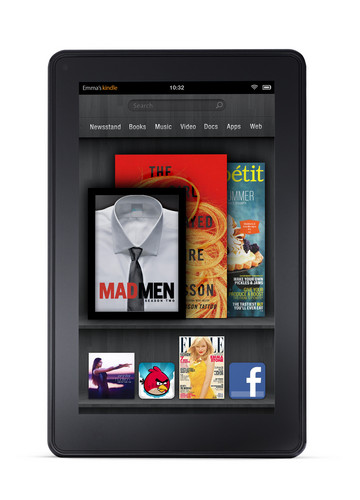
Last week, Amazon officially unleashed the Kindle Fire on the public. After a month of speculation, people finally got to be hands on with the device and the reviews came flowing in. Most reviews of the device mistakenly took the point of view that the Kindle Fire was an iPad killer, expecting $500 performance from a $200 device.  Again, this was a mistake, and proof that several gadget sites do not understand the product. I would seem that commenters on related threads also have the same problem.

Stop it!

The Kindle Fire is not meant to be an iPad killer. It never was meant to be an iPad killer. And if that’s what you’re looking for in the device, you’re going to be disappointed.  The Kindle Fire was designed from the ground up to be nothing more than a portal into Amazon’s services.  If you can’t understand this basic fact, you will never understand the Kindle’s market. Here’s a hint, it’s not people who want to buy iPads. Sure some people might pick up the Kindle Fire instead of an iPad, but the limited apps and functionality of the tablet will cause those people to buy an iPad eventually anyway.  The Kindle Fire’s market is those that are already tied to Amazon’s services, be it the Kindle books or the Amazon Video.  If someone already has a Amazon Prime membership, then the Kindle Fire is a device they might consider.

The Kindle Fire is meant to be a portal into Amazon’s ebook, video, music, and app store services.  A way for Amazon to pimp their services to a consumer and have them buy more books, video, and music.  It is meant to be a media consumption device, and that’s all. It is not meant to be a working device, in that you do actual work on it like you would on an iPad. The Kindle Fire is for media consumption, and Amazon wants you to buy that media through them.

So please, stop thinking and treating the Kindle Fire as an iPad killer. It’s not.


Posted in Commentary, Technology | 1 Comment

Intro to iPhone Development at Houston Open Dev User Group

Last night at the Houston Open Development User Group, I presented an introduction to iPhone development. Through the course of 2 hours I covered the very basics of iPhone development, from Objective-C to actually creating and wiring up a user interface for an iPhone application. For the demo application, I built a simple Twitter search application that allows a user to type in a search query and see the first 15 results returned from the Twitter search api.

If you attended the meeting, I encourage you to rate the talk on SpeakerRate. If you’re interested in the final code, you can check that out on Github as well. Below, you’ll find the slides from the presentation.

Posted in programming | Tagged , , | Comments Off on Intro to iPhone Development at Houston Open Dev User Group