Privacy in a World with Location Services

A lot of people have an iPhone.  If you’re using a a 3G or 3GS iPhone, you have GPS in your phone.  This GPS feature makes using location aware applications and services extremely useful because it’s easier to let the GPS pinpoint your location than it is for you tell a service where you are.  Location based social networks like FourSquare and Gowalla, have constructed businesses built around this idea and they’re pretty fun to participate in.  The more spaces you add and visit, the more “prestige” you get.

However, the other day when I was using Gowalla on my iPhone to check in at a place I was at (local business close to my home), I noticed something when Gowalla pulled up the locations I was close to.  What I noticed was an entry labeled “[PERSON’S] House”  (I have omitted the person’s name to protect their privacy at  least a little).  Who in their right mind thought that it was okay to add a personal’s physical residence (where they live) to a social network like this?  This is a huge invasion of privacy on that person’s part.  And if the person who’s house it is, said it was okay, why would they do that?  There are lots of crazies in the world why would you give everyone pinpoint accuracy to where you live.  It’s just not a smart move at all.

I understand that the younger generation has lived in a world of Facebook, MySpace, Twitter, and other social networks.  Things like this just weren’t around when I was in my teens (no, I had to use IRC and newsgroups and the web was still young).  Granted, I’m not going to sit here and tell you that everyone on the internet is a child pornographer, perv, or creep.  But people like that do exist and while we have these social networks, one should still exhibit some discretion when they post information to the public internet.  Especially on networks that revolve around location.

To be fair, I do participate in location based social networks (Gowalla fan/user here), but I’m very particular about where I check in at.  Also, when using Tweetie 2’s (iPhone Twitter app) new geo-tagging feature, I turn it off when I’m at home.  I don’t need that level of privacy broken.  Sure, you could probably find the area I live in quite easily based on tweets, pictures, and other miscellaneous info I’ve posted around the internet.  But exact address, nope sorry (unless I’ve designated you allowed to on Facebook which if that’s the case you probably already know it anyway).  But I won’t geo-tag a tweet from home, that’s too much information the internet does not need to have cached somewhere.

People, I implore you, use common sense when using location based social networks.  Don’t put people’s personal residences in to the database and sure as heck don’t allow others to do it (even with consent).  It’s just not a good idea and too much potential bad can come from it.

Posted in Commentary, Technology | Tagged , , | 4 Comments

Michael Koby’s First & 20

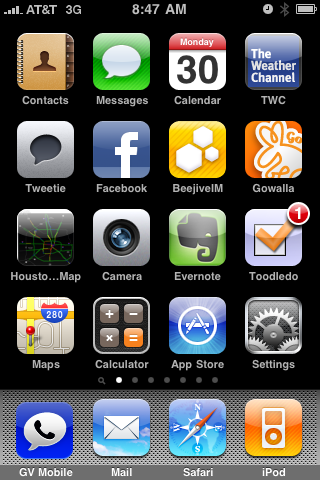
mkoby's iPhone Home ScreenAfter visiting and reading through the website, FirstAnd20, I decided to one for myself. The concept is simple, you screenshot your iPhone’s first home screen and then explain what apps you have on there and why. You can also touch on apps that might not be on the first page but that you use regularly.  Here we go…

If you look at my home screen you’ll notice that with exception of a single row most of the apps on my home screen are either the default app, or an app that improves upon exisiting default apps. For example, the Evernote app replaces both the default Notes and Voice Memo apps. Also the Weather Channel app replaces the default Weather app.  You’ll notice that my bottom 4 apps remain unchanged except for the fact that I have jailbroken my device so that I could install the updated version of GV Mobile, giving me a Google Voice app on my phone.  I’ll continue to use this app until Google brings out their nice web app or Apple approves the official iPhone Google Voice app.  The GV Mobile app has replaced the Phone app on my bottom row.

Some of the none default apps you see are:  Tweetie 2, which is hands down the best Twitter app on the iPhone. It doesn’t crash and it’s feature set is fairly complete. Not to mention some of the user interface and user experience touches that really improve it’s usability over other Twitter iPhone apps.  For those that might try to convince me otherwise, I have tried most of more popular Twitter apps for the iPhone.

There’s the Facebook app which really needs zero explaination. The BeeJive IM app which I use to maintain instant msging presence (this is also how I communicate with the wife while on the go). I use the Gowalla app to checkin at places I visit. I prefer Gowalla to FourSquare.  There is also a Safari bookmark to the Houston area traffic map which is a must when driving around Houston at any given time.  And finally there is the Toodledo app which I use to manage my todo list. It syncs with the Toodledo website allowing me to have my todo list anywhere I’m at.

Apps that are not on my main page that I use frequently include the USA Today app for news, Shoutcast and Pandora for streaming music, and the game I’m currently playing is Fling.  Also, I use Wikipanion, which is a great Wikipedia app for the iPhone and essentially turns the iPhone into the Hitchhiker’s Guide.

So there you have it.  My FirstAnd20.  What’s yours?

Posted in Technology | Tagged , , | Comments Off on Michael Koby’s First & 20

Michael Koby's First & 20

mkoby's iPhone Home ScreenAfter visiting and reading through the website, FirstAnd20, I decided to one for myself. The concept is simple, you screenshot your iPhone’s first home screen and then explain what apps you have on there and why. You can also touch on apps that might not be on the first page but that you use regularly.  Here we go…

If you look at my home screen you’ll notice that with exception of a single row most of the apps on my home screen are either the default app, or an app that improves upon exisiting default apps. For example, the Evernote app replaces both the default Notes and Voice Memo apps. Also the Weather Channel app replaces the default Weather app.  You’ll notice that my bottom 4 apps remain unchanged except for the fact that I have jailbroken my device so that I could install the updated version of GV Mobile, giving me a Google Voice app on my phone.  I’ll continue to use this app until Google brings out their nice web app or Apple approves the official iPhone Google Voice app.  The GV Mobile app has replaced the Phone app on my bottom row.

Some of the none default apps you see are:  Tweetie 2, which is hands down the best Twitter app on the iPhone. It doesn’t crash and it’s feature set is fairly complete. Not to mention some of the user interface and user experience touches that really improve it’s usability over other Twitter iPhone apps.  For those that might try to convince me otherwise, I have tried most of more popular Twitter apps for the iPhone.

There’s the Facebook app which really needs zero explaination. The BeeJive IM app which I use to maintain instant msging presence (this is also how I communicate with the wife while on the go). I use the Gowalla app to checkin at places I visit. I prefer Gowalla to FourSquare.  There is also a Safari bookmark to the Houston area traffic map which is a must when driving around Houston at any given time.  And finally there is the Toodledo app which I use to manage my todo list. It syncs with the Toodledo website allowing me to have my todo list anywhere I’m at.

Apps that are not on my main page that I use frequently include the USA Today app for news, Shoutcast and Pandora for streaming music, and the game I’m currently playing is Fling.  Also, I use Wikipanion, which is a great Wikipedia app for the iPhone and essentially turns the iPhone into the Hitchhiker’s Guide.

So there you have it.  My FirstAnd20.  What’s yours?

Posted in Technology | Tagged , , | Comments Off on Michael Koby's First & 20

Online Video & Content Makers

These days, it seems like everyone is cutting access to thrid-party hardware/software.  Hulu did it with Boxee and now YouTube is doing it with non-approved partners (like Popcorn Hour).

When it comes to online content, streaming movies through services like Vudu, and Netflix’s “Watch it Now” the content makers are doing one of the best jobs of shotting themselves in the foot, and doing it with the up-most of consistency.

YouTube’s New Policy

Let’s look at the recent YouTube development first.  This announcement pretty much comes on the heals of YouTube releasing 1080p (full HD) video on its site.  Which means if I’m using something to stream YouTube to my HD television, I can get some streams in nice full HD, which makes it really nice to watch on my television.  To a degree it makes sense.  Especially if content makers are going to use YouTube to release content, they’ll definitely want a cut of the financial pie so Google has to take steps to ensure they somehow derive revenue from this.  But not everything on YouTube is put up by Hollywood and there in lies the problem.  There should be no issue with me streaming non-Hollywood content to my TV on an unapproved device.  There’s a simple solution for this, YouTube could simply have a second API that you have to pay to get access to, leaving them with 1 public API and 1 private API.  They’re already monitoring video uploads for copyrighted content and they take those takedown notices very seriously so there should be nothing stopping them from segregating what’s available to different APIs.

Hulu Blocks Boxee

Hulu actually has an argument.  The point of Hulu is to watch TV shows on your computer and having to watch ads.  Since the content on Hulu is provided by Hollywood, they can to some degree control how it’s viewed.  It makes sense that these content makers would rather you watch TV shows on air or on a DVR where they can bombard you with commercials rather than having you watch it on your computer via Hulu where the number of commercials is limited.  In the end though, the lack of being able to stream Hulu to my television is going to cost them viewers and with their recent announcement to start charging soon, Hulu is going to die faster than initially planned, unless they can ink deals with hardware makers and find their way onto things like Blu-Ray players (like Netflix).

Vudu & Netflix “Watch it Now”

Finally, something that makes zero sense.  Movie studios purposefully hold back video from providers like Vudu and Netflix.  Example, on Vudu if I want to rent the HDX version (near Blu-Ray quality video) on my LG Blu-Ray player, on many movies I have to wait a month after the movie is available to purchase.  These studios do the same thing with Netflix’s “Watch Instantly” for newer movies.  In fact, the Netflix instant watch feature is loaded with movies and television shows that are either old, B grade, or even just flat out unwatchable.  Yes, there are some good titles available but they are generally the exception rather than the rule.

The logic behind this is that I won’t go and buy it if I can rent it for cheap.  Which is completely the wrong thought process because really, if I’m iffy on a movie, I won’t buy it period.  However, if I can rent it or see it cheaply (say Vudu streaming rental or Netflix “Watch it Now”) I’m more likely to buy it if I enjoy the flick.  In fact I have purchased several movies due to seeing them using “old-fashioned” Netflix (you know, where you actually get a DVD in the mail).

Conclusion

All these companies are doing the same basic thing.  They are limiting how we can watch content.  They are dictating how we are allowed to watching something rather than letting the market tell them how we want to watch content.

They think that if they can control how we watch content they can in turn control how we buy it.  And this is just backwards.  Let the market figure out how it wants to watch content and then do that.  Because long term, how the average consumer actually consumes content will change.

Posted in Commentary, Technology | Tagged , , , , , | Comments Off on Online Video & Content Makers

Thoughts on Google’s Chrome OS

Google Chrome OSYesterday, Google held an event to demo it’s newest product, Chrome OS.  This operating system designed for (at first) netbooks (like Asus Eee PC) runs a modified Linux kernel to interact with the hardware and then runs a heavily modified Chrome browser as it’s user interface.
While people will argue the merits of this OS up and down over the next year, and when it’s finally released (by the 2010 holiday season), I wanted to point out a few things I found both good and bad about the ideas presented at the announcement.

Some things to like about it are:

  1. Very fast boot up
  2. Cloud based storage (your data can’t be “lost” because its not on the machine)
  3. Secure, the OS (since it’s a browser) doesn’t trust anything. And it does a check on boot up to ensure that hash keys match against google servers, if they don’t then the machine is basically wiped and reinstalled on the fly.

Some things to NOT like:

  1. No native apps. While not a big deal long term this might affect people’s initial opinion/adoption at first
  2. Will require new hardware designed with this OS in mind. You can’t download and install it to a current machine. (You can apparently can currently install to a Asus Eee PC, but it requires some hacking).
  3. Requires an internet connection. They didn’t go over the “offline mode” in great detail at the event, but the release is 1 year off and google has offline tools (Google Gears), which will probably come in to play here.

Overall, I think that this will be pretty nifty if still very niche.  I think that there’s a good chance that this won’t succeed like Google would like.  But I think that the fact that they are making efforts in moving the web forward (something very important to them) is a good thing.  Chrome OS is innovative even if it might not be overly functional.  But what we saw yesterday was an early preview and they did say many things will change between now and the official release.  I for one am interested in at least giving it a go to see what it’s going to be like.

If you want to get an idea of what this OS will be like, download Google Chrome and run it full screen on your computer and don’t run ANY desktop applications.  Or you can pick up a VMWare or VirtualBox image at Gdgt.

Posted in Technology | Tagged , , | Comments Off on Thoughts on Google’s Chrome OS

Thoughts on Google's Chrome OS

Google Chrome OSYesterday, Google held an event to demo it’s newest product, Chrome OS.  This operating system designed for (at first) netbooks (like Asus Eee PC) runs a modified Linux kernel to interact with the hardware and then runs a heavily modified Chrome browser as it’s user interface.

While people will argue the merits of this OS up and down over the next year, and when it’s finally released (by the 2010 holiday season), I wanted to point out a few things I found both good and bad about the ideas presented at the announcement.

Some things to like about it are:

  1. Very fast boot up
  2. Cloud based storage (your data can’t be “lost” because its not on the machine)
  3. Secure, the OS (since it’s a browser) doesn’t trust anything. And it does a check on boot up to ensure that hash keys match against google servers, if they don’t then the machine is basically wiped and reinstalled on the fly.

Some things to NOT like:

  1. No native apps. While not a big deal long term this might affect people’s initial opinion/adoption at first
  2. Will require new hardware designed with this OS in mind. You can’t download and install it to a current machine. (You can apparently can currently install to a Asus Eee PC, but it requires some hacking).
  3. Requires an internet connection. They didn’t go over the “offline mode” in great detail at the event, but the release is 1 year off and google has offline tools (Google Gears), which will probably come in to play here.

Overall, I think that this will be pretty nifty if still very niche.  I think that there’s a good chance that this won’t succeed like Google would like.  But I think that the fact that they are making efforts in moving the web forward (something very important to them) is a good thing.  Chrome OS is innovative even if it might not be overly functional.  But what we saw yesterday was an early preview and they did say many things will change between now and the official release.  I for one am interested in at least giving it a go to see what it’s going to be like.

If you want to get an idea of what this OS will be like, download Google Chrome and run it full screen on your computer and don’t run ANY desktop applications.  Or you can pick up a VMWare or VirtualBox image at Gdgt.

Posted in Technology | Tagged , , | Comments Off on Thoughts on Google's Chrome OS